




VSDC Free Video Editor Review You Should Not Miss
VSDC Free Video Editor is a feature-packed non-linear suite video editing program. It is designed for Windows devices and is recommendable for first-time and advanced users. This post will provide comprehensive details about the program, its features, and more. Besides that, it will present an alternative tool that helps users produce professional-looking videos. Without further discussion, count on the following details.
SEITENINHALT
Part 1. VSDC Free Video Editor Review
What is VSDC Free Video Editor?
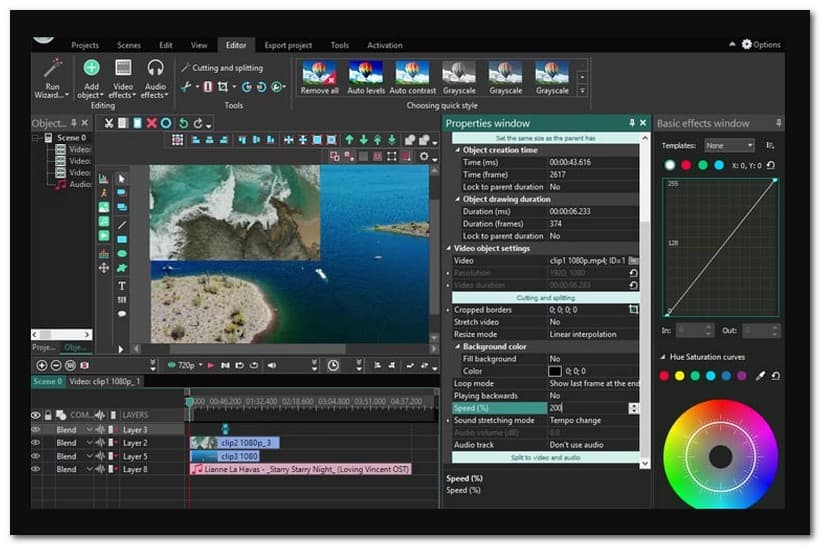
VSDC Free Video Editor is a video editor program that provides several editing options for video editing purposes. It is recommendable for first-time and experienced users on a budget. This program supports numerous audio and video codecs and formats. Besides that, it enables users to record voice commentaries and captures video and computer screens.
VSDC Free Video Editor includes various video effects, including background remover, picture-in-picture, split screen, color correction, and more. Besides that, it provides basic editing operations, such as cutting, cropping, merging, rotating, incorporating texts, subtitles, transitions, filters, and more. With these functions, users can create a better video appearance and outcome that can be shared; even someone with no experience can take advantage of them.
Aside from the mentioned features above, users can produce video content from audio files, still images, and video clips. It has a drag-and-drop, step-by-step wizard that guides you to create a project even if you are unsure what you are doing. They can layer these in various ways, such as blending, masking, and overlaying. In addition, users can produce a full high-definition video output that will appear more transparent and crisper on screen.
However, VSDC Free Video Editor’s interface is not user-friendly; it has some major limitations. The interface is powerful, but it is not for users who do not have any background when it comes to video editing. A lot of information is displayed at any given time-enough to overwhelm first-time users. Besides, users cannot preview a video straight from the editor; they can only play the video using a media player. Also, previewing and exporting 4K video output is extremely slow. In addition, many functions are hidden in sub-menus, which first-time users find difficult to locate.
Unterstützte Formate
| Eingabeformate | Videoformate: AVI, QuickTime, AVCHD (TOD, MOD, TS, MTS, M2TS), Windows Media (ASF, WMV, DVR-MS), VCD/SVCD, DVD/VOB, MPEG/MPG/DAT, Matroska Video (MKV), Real Media Video (RM, RMVB), Flash Video (FLV, SWF), AMV, DV, NUT, MTV, H.264/MPEG-4, DivX, XviD, WebM, MJPEG, Vp8, and VP9. Image Formats: JPG/JPEG, BMP, PNG, GIF, ICO, PSD, and CUR. Audioformate: MP3/MP2, M4A, WMA, FLAC, AAC, OGG, RA, RAM, WAV, VOC, AIFF, AC3, MPA, AIFF, APE, AU, CDA, and CUE. |
| Ausgabeformate | Videoformate: MP4, M4V, MOV, AVI, DVD, VCD/SVCD, MPEG, 3GP/3G2, WMV, RM/RMVB, MKV, FLV, SWF, MTC, AMV, MTV, WebM, VP8, and VP9. Image Formats: PNG, BMP, JPEG, SVG, and GIF. Audioformate: MP3, AAC, M4A, AMR, OGG, and WAV. |
Hauptfunktionen
VSDC Free Video Editor has two versions: Free Video Editor & Pro Video Editor. The free version has limited editing options, while the paid version has advanced features. Here, we will tackle the key features of VSDC Free Video Editor.
Basic Editing - Users can cut, trim, rotate, resize, split, and combine video clips among the basic editing options. It has a color correction and overlaying options and can edit 36-degree videos, chart tools, and more.
Effects - There is a vast collection of audio, video, and text effects. Users can incorporate objects into their videos and apply various ready-made themes. Users can also apply transitions between video clips and slides. In addition, users can use the green-screen effect to change their video’s background.
Capture Video - It has a feature that can capture any screen activities on the user’s computer screen. Besides that, it can create a slideshow from videos and images. Users can record their voiceover if they want to.
File Formats - The impressive part about the program is that it supports popular file formats for importing and exporting audio and video files. It offers various export profiles, which users can save their edited video for different devices hassle-free.
Low System Requirements - Unlike most video editors, this program does not demand high-system configurations. With that, even low-end desktops with outdated Windows operating systems can access the program without experiencing any issues.
VSDC Tutorial on How to Crop Video
Step 1. Suppose that you already imported a video file on the program. Head to the top menu bar and press the Crop Borders icon.
Step 2. You are offered to crop a specific region of a video or use an auto-cropping option. If you select Custom Region, a window will appear on your screen, and select the area from the video you want to crop.
Step 3. Once satisfied with the outcome, press the Export button, and select your preferred output format.
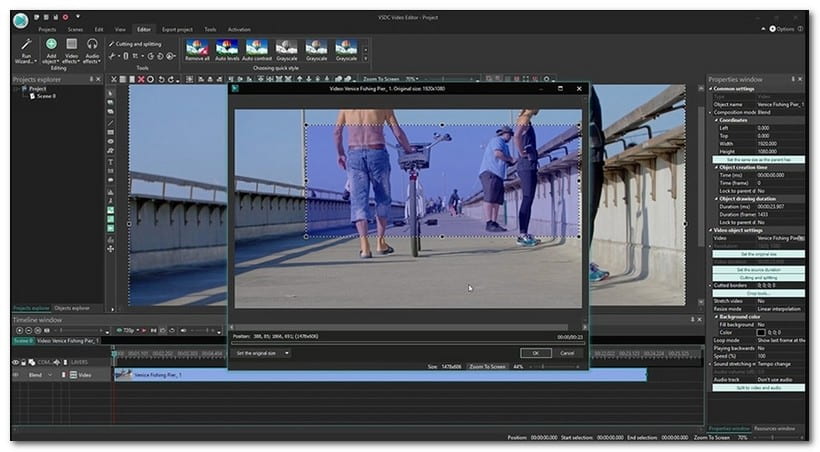
As simple as that, you can crop your video quickly and hassle-free; that is how VSDC crop video works.
Part 2. Why Does VSDC Free Video Editor Crack
VSDC Free Video Editor has a free and licensed version, which is the licensed version that users crack to activate the program. It is cracked using a third-party application, knowing that the program is accessible for outdated Windows operating systems, meaning it is easier to crack.
Part 3. VSDC Free Video Editor Alternative
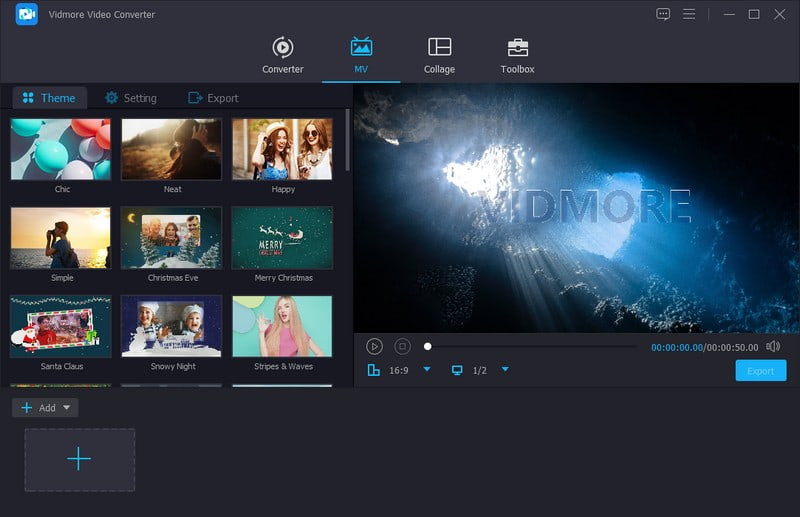
VSDC Free Video Editor is only available on Windows devices, so we highly recommend Vidmore Video Converter. This program has essential built-in features and editing functions to help you produce stunning video content. It has a converter to convert your audio and video files to other output formats. It has a collage maker to create a collage using various image and video files without number limitations. It has a section consisting of several tools for basic and advanced audio, image, and video editing. Amazing, right?
Vidmore Video Converter has a built-in MV feature, allowing users to create various video content. They can create a slideshow from an image or video clips, produce a movie trailer, make presentations by importing multimedia files, and more. Besides that, it offers editing options, like rotate, crop, effects, filters, and watermark. Also, users can add ready-made themes, text, and background music. The impressive part is that users can change their video format, resolution, and more according to their needs. Indeed, Vidmore Video Converter is the most excellent video editor you can try.
Part 4. FAQs about VSDC Free Video Editor Review
Does VSDC work on Mac?
Leider ist der VSDC Free Video Editor auf Mac-Geräten nicht verfügbar, da er nur für Windows-Betriebssysteme erhältlich ist.
Is VSDC no watermark?
Der VSDC Free Video Editor versieht Ihre Videoprojekte nicht mit einem Wasserzeichen, sodass Sie verschiedene Inhalte erstellen können, ohne sich darüber Gedanken machen zu müssen.
Is VSDC safe?
In der Tat ist die Verwendung sicher, da sie Sicherheit garantiert und die importierten und exportierten Dateien geschützt sind.
Fazit
This post presented VSDC Review, which helps you gain a broad background about the video editor. It offers several editing features that can help users to create impressive videos. However, you can rely on Vidmore Video Converter if you want to have many basic and advanced editing options you can use. Besides that, it has a lot of options to make your video more appealing.